It’s not commonly known, but it’s super easy to move a website hosted on SiteGround to another SiteGround account. You do not need to do a traditional migration of files and the database! If your DNS is at SiteGround, it takes only a few clicks in fact!
If your DNS isn’t at SiteGround, you should make sure you have access to the DNS records in case you need to change the @-record IP address before starting.
How To Do It
- Log into the SiteGround account of the site you want to transfer.
- Go to Websites, then find the website you want to transfer and click Manage.
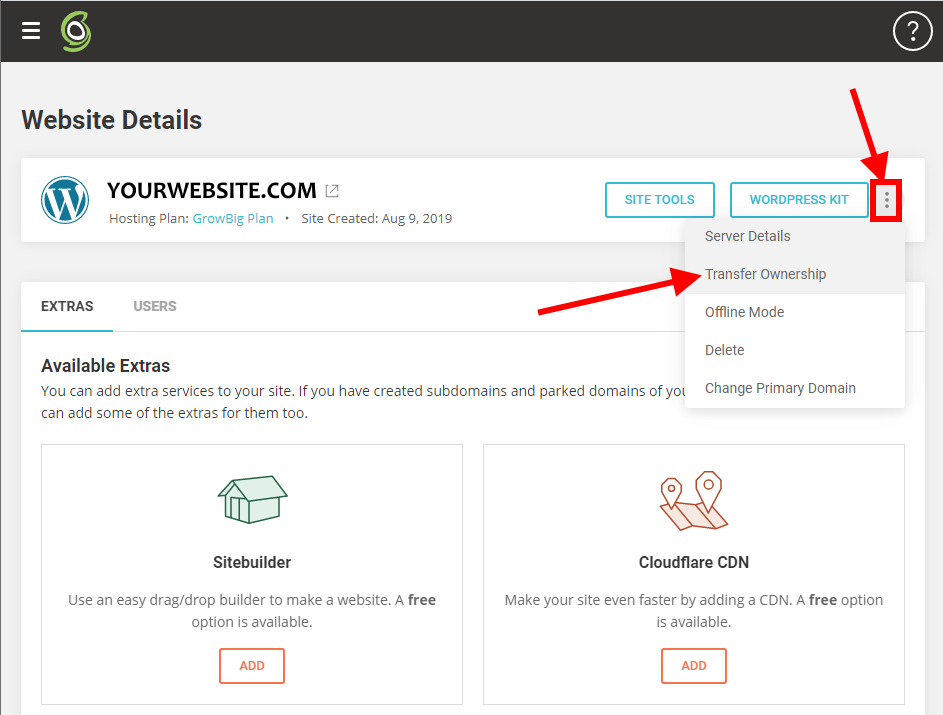
- Click the three-dot “kebab” icon at the end and select Transfer Ownership:
- When prompted, specify the account that you want to move the site to.
- The transfer should only take a few seconds! (This leads me to believe that pointers are simply being updated, rather than actual files and database being moved.)
- Log out, then log into the destination account to confirm the transfer.
- If the site’s DNS records were not at SiteGround, then update the DNS records with the new IP address, if necessary.
Your files, databases, email accounts, and SSL certs should all be migrated. Here’s SiteGround’s article on this.
When It Won’t Work
Note that if you already have the domain added to your new account, Siteground won’t let you do the transfer. Here’s the message you will get:
“We already have a record of a site with this domain name. Make sure it is not used by you as a parked or main domain for another site. If it was but you recently deleted it, please wait for one hour before trying to use it again. Otherwise, please use another domain name for your new site”
So, before moving, delete the domain on the new hosting plan.
Also, readers Andy and Dorian pointed out that for security reasons, Siteground will only let you transfer one account per day.
How Did It Go For You?
I was amazed at how easy this was when I transferred a WordPress site (and grateful that I didn’t have to manually migrate files and databases!) Let me know how it worked for you! – Brian

I am a freelance web developer and consultant based in Santa Monica, CA. I’ve been designing websites using WordPress and from scratch using HTML, CSS, PHP, and JavaScript since 2010. I create websites and web applications for businesses, nonprofits, and other organizations. I have a degree in Electrical Engineering (BSEE) from California Institute of Technology and a degree in Engineering Management (MSEM) from Stanford University. If you need help with your site, you can hire me!
Thank you for this helpful guide! Transferring a SiteGround website to a different account can be daunting, but your step-by-step instructions make it seem straightforward. Much appreciated!
Hi Brian
I have an existing hostplan with siteground with a wordpress website with domain name with namecheap and recently bought a new grow big hostplan for way cheaper than the monthly I am paying at moment but when I try to set up my existing website with new hostplan it keeps telling me i can not use the existing domain name as “We already have a record of a site with this domain name. Make sure it is not used by you as a parked or main domain for another site. If it was but you recently deleted it, please wait for one hour before trying to use it again. Otherwise, please use another domain name for your new site?
I do not wish to change my domain name of my existing website how do i transfer /migrate/add existing site ground website to the new host plan please?
You need to have a dummy domain already on the new SG account, then transfer your existing domain.
by dummy domain you mean i can choose the option of temporary domain in the set up instead of choosing the existing domain?
Andy by “dummy domain” do you mean the “temporary domain” option given when setting up new account instead of using the existing domain option
I just bought a cheap domain and added it to new account then transferred the existing domain from the existing SG account to new SG account
Hope that works 4 u Louise
Yeah, on your new hosting plan, remove the domain (which now has no site on it), then do the transfer. – Brian
how do you remove the domain? there is no domain yet as I am not able to set up yet past choosing domain?
Louise, if you have no domain on your new SG account you need to add one 1st even a cheap whatever name domain like a $1 one etc, then you can transfer your domain from your old SG account, I know as I have done it before…
I was preparing to ask support what was the way to do a website transfer, when I found your article. Really simple indeed. Thanks for sharing this.
One note though, I have two websites to transfer to their rightful owner, I did one, but for security purposes they only let you do one at a time, as Andy Nock mentioned. So I’ll have to wait until tomorrow.
@Andy, it does offer to transfer email accounts, which you can decline or accept.
It transfers email accounts cannot remember if you can cancel or decline email accounts though
Thanks for the info Brian, does it move your Siteground email accounts as well? This maybe be a way to save on the renewal costs which are a big jump from when you 1st sign up. I am on Grow Big, so I just sign up a new Grow Big and transfer all my domains I take it? Cheers.