One of the most annoying things about the Divi theme is that often, elements of a page shift around upon load and take a few seconds or more to stabilize. This is technically known as Cumulative Layout Shift (CLS), and when this is high, it is red-flagged in Google Search Console, Google Pagespeed Insights, and almost every other tool that measures speed metrics, adversely affecting your SEO, not to mention your site’s user experience.
For me, using the built-in Divi performance functions (i.e., Dynamic Module Framework, Criticial CSS, Output Styles Inline, etc.) didn’t noticeably reduce CLS. Oh, and switching to Divi 5 doesn’t solve it either, unfortunately.
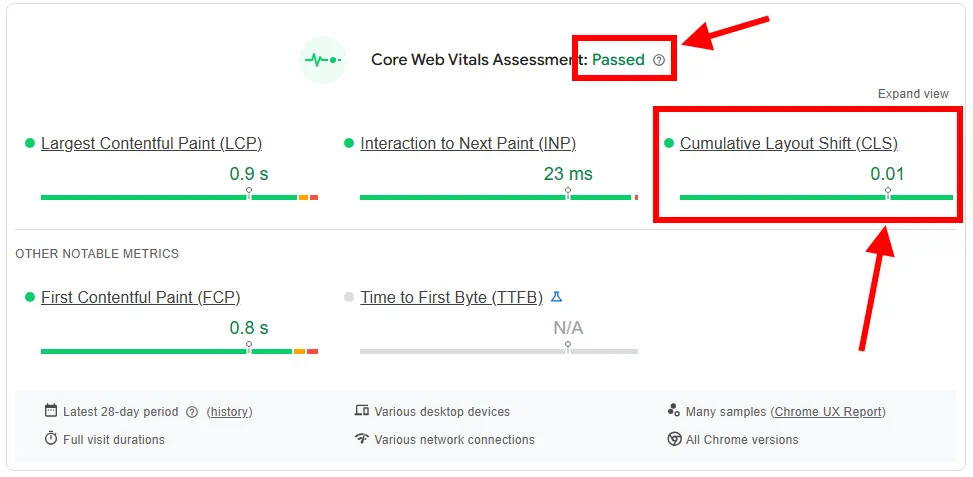
In this article, I’ll show you how to reduce CLS in your Divi site to almost zero as shown here in a real Google Pagespeed Insights report on a formerly problematic Divi site that I optimized:
Unfortunately, the Problem Still Exists in Divi 5
One of the things I was hoping for in Divi 5 was that the CLS problems would be fixed. Unfortunately, they’re exactly the same as in Divi 4.
The Causes of CLS in Divi
If you have a transparent or large fixed nav bar, there is some JavaScript that tweaks padding values after the HTML is rendered, resulting in a very obvious shift after a long delay. You can prove this by turning off JavaScript in your browser; the CLS below the nav bar will go away (but the content below it might not be situated properly).
With a transparent nav bar, you can also see the difference if you make the nav bar opaque in the Customizer. The CLS will disappear! Unfortunately, if you want to get around this problem by using your own CSS to make the nav bar transparent, you won’t get the effect you want. The content that is supposed to be behind it will be below it instead, and you won’t see it behind your transparent nav bar.
A similar thing happens when you have a large fixed nav bar. By “large”, I mean the “Menu Height” setting for the Primary Menu Bar in the Customizer. I’m not sure where the cutoff point is where the CLS doesn’t happen. With a value of 66px it seems fine. Also, if you make the nav bar not fixed (in the Divi Options settings page), the CLS goes away.
The Fake Solution
Probably the most common Divi CLS “solution” out there online is to just hide the page using CSS, then wait for everything to stabilize and unhide the page using JavaScript.
Amazingly, this actually fools Google Search Console into thinking there is zero CLS! After I did this hack, pages went from red to green in GSC’s Core Web Vitals! So in that respect, it works!
But obviously, this is just hiding the problem and tricking the test. The user experience is even worse than before because all you see is a white screen until every pixel stabilizes, which can take several seconds or a lot more! In my opinion, this cure is worse than the disease.
Solution #1: Sacrifice Features
The easiest solution is to just disable the combination of features causing the problem, i.e.:
- Make your transparent nav bar opaque (it can still be transparent after scrolling down)
- Or, make your large fixed nav bar smaller
- Or, make your fixed nav bar not fixed
This is an easy solution, but sacrifices features that you might need.
Solution #2: Force CSS
A real solution that does not sacrifice functionality is to check the top-padding values of the first section on your page after Divi has tweaked them using your browser’s inspector, then add those to your CSS so they are applied immediately. Here’s the code I used to fix my site’s CLS due to transparent header:
/* STOP DIVI CLS! */
.et_builder_inner_content > .et_pb_section:first-child  {
	padding-top: 134px !important;
}
Note that your padding-top value will vary according to the height of your menu bar; check your browser inspector to find the value that Divi sets it to on your site.
If the height of your menu bar is different on mobile than on desktop, you’ll need to check the mobile case and apply that separately using a media query like this:
/* STOP DIVI CLS! */
.et_builder_inner_content > .et_pb_section:first-child  {
	padding-top: 80px !important;
}
@media (max-width: 980px) {
	.et_builder_inner_content > .et_pb_section:first-child  {
	padding-top: 50px !important;
}
}
Again, these values are specific to my site; check your inspector to find your values at deskop an mobile widths.
Any Custom Styles in the Divi Editor
The second cause of Divi CSS is basically any local styling changes you make to a Divi Section, Row, or Module in the Divi editor. All of this CSS gets put at the end of the page HTML, meaning the whole page renders first, and then this CSS takes effect, causing shifting.
The Solution
The solution to this is more straightforward: use a plugin that combines your CSS files into one and puts it at the beginning of the file.
I used the Lightspeed Cache plugin on an Open Lightspeed server. While I was at it, I also minified the CSS, and HTML. The CLS vanished!! Just note that the plugin is set by default to only work when not logged in, so be sure to test on a different browser that is not logged in. Otherwise, you won’t see the effects!
There are many plugins that do this type of speed optimization. Another free plugin I tried is WP Optimize. Siteground’s Speed Optimizer plugin should work as well.
Other Causes of CLS
The causes of CLS above are only the ones that are unique to Divi. Of course, there are other causes of CLS that apply to any site, including large image file sizes, poor web hosting, bad JavaScript, and so on. You need to fix all of those things. Good caching might help as well.
Some Site Examples
Here are some Divi sites that had horrendous CLS that I fixed using these techniques and now have almost no CLS:
- https://www.ladateideas.com/ (Divi 5) – kept transparent header and forced padding using CSS with media query for mobile and optimized with Lightspeed Cache plugin.
- https://brianshim.com/ (Divi 5) – kept transparent header and forced padding using CSS, and optimized with Lightspeed Cache plugin.
- https://coastalmetalrecycling.com/ (Divi 4) – had large fixed header; made not fixed and optimized with WP Optimize plugin.
Summary of How to Fix Divi CLS
To summarize, here are the steps to fix Divi’s CLS problem:
- Avoid using a transparent nav bar. Make the background opaque.
- Avoid using a large fixed nav bar. Reduce the height or make it not fixed.
- Use CSS to force the offending sections to have the larger padding out of the gate.
- In addition to these, use a plugin to combine and minify your CSS.
- Do all of the other known practices that help CSS in general, such as optimizing image sizes, caching, using quality web hosting, minifying files, lazy loading images, and so on.
If you do all of these things, your Divi CLS problem should be solved. Did it work for you? If not, please comment below – you may have found a case that I missed! If it did work, please comment as well. I’d love to hear from you. – Brian

I am a freelance web developer and consultant based in Santa Monica, CA. I’ve been designing websites using WordPress and from scratch using HTML, CSS, PHP, and JavaScript since 2010. I create websites and web applications for businesses, nonprofits, and other organizations. I have a degree in Electrical Engineering (BSEE) from California Institute of Technology and a degree in Engineering Management (MSEM) from Stanford University. If you need help with your site, you can hire me!
Please Leave a Question or Comment