Recently, after cloning this site to the same server but with a new subdomain, I had a problem where the WordPress admin had no styling. The strange part was that the front-end was perfectly fine!
The error was that when an admin tried to load CSS using https://developer.brianshim.com/wp-admin/load-styles.php, the server was returning a 404 error.
I tried all of the standard quick fixes including clearing caches (and eventually disabling them altogether), turning off all WAFs, WordFence, etc., bypassing Cloudflare, and re-saving permalinks. Nothing helped.
I spent time with Chat GPT and it just led me down fruitless rabbit holes.
The Solution
Finally I tried good old-fashioned Googling and that led me to the solution in this Stack Overflow article.
The solution is to disable WordPress’ concatenate scripts using one line in the wp-config.php file:
define( 'CONCATENATE_SCRIPTS', false );Voila! That fixed it!
You can also do this if you have Gridpane hosting in the Security tab of your site:
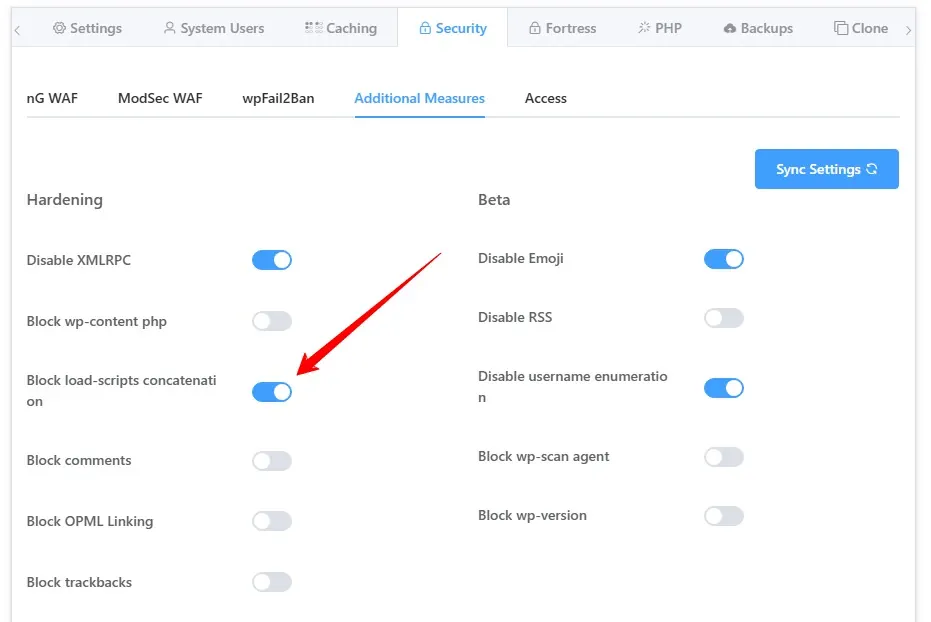
But, I was wondering if it was OK to leave it off. After all, isn’t concatenating script files a good thing to decrease the number of server calls?
The answer is: it’s ok to leave it off if your host supports HTTP/2, which my host, Gridpane, does. In fact, they recommend leaving this off.
But it turns out it’s not necessary if you don’t want to! If you turn it back on, the problem does not return!
So it seems that toggling this setting is what fixes the problem. It’s possible there is some sort of caching that gets reset when you do this. If you know the answer, please leave a comment!
I wrote this up in case it happens again for me; hope it helps you too! – Brian

I am a freelance web developer and consultant based in Santa Monica, CA. I’ve been designing websites using WordPress and from scratch using HTML, CSS, PHP, and JavaScript since 2010. I create websites and web applications for businesses, nonprofits, and other organizations. I have a degree in Electrical Engineering (BSEE) from California Institute of Technology and a degree in Engineering Management (MSEM) from Stanford University. If you need help with your site, you can hire me!
Please Leave a Question or Comment